DISK FORGE C64U - For C64 Ultimate Only
A downloadable tool
Cut a real floppy from a .d64, on the machine itself, in about ninety seconds.
A utility for the Commodore 64 Ultimate. Pick a disk image off the SD card, USB stick or internal flash, put a blank disk in your 1541, and get a real floppy out of it — byte-identical to the image, verified.
Free, and downloadable here. v0.4 — now with the turbo formatter as well as the turbo writer: blank disk to finished, verified disk in about two minutes (format + write). I would still like your bug reports.
Why this exists
I just wanted to cut a floppy disk from a selected .d64 image. That was it, that's all I wanted. But I couldn't find a utility to SIMPLY write an image from the C64U's storage to my physical 1541, without a multi-step workaround (see below on how this has been handled in the past).
So I made one.
The old guard workaround goes like this... From the C64U's backend menu, disable the emulated drive 8, enable the emulated drive 9, navigate to and mount the image on the Ultimate's emulated drive 9, put the real 1541 on device 8, locate and run a 1980s disk copier (like Maverick) and set up the transfer in the software to copy one drive to the other.
There's no denying the workaround, well... works. But just the setup alone adds friction and time to producing a physical disk from an image, and it means owning and knowing a period copier. It NEVER felt like the right answer to a question this simple — just put my image on disk and spare me the unnecessary monkey-motion! Which is why Disk Forge 64U exists.
And unlike Disk Forge 64U, a period copier's fast mode (Maverick's Fast Data Copier, say) won't crank out a byte-identical disk — it trusts the BAM and skips the sectors marked free. Maverick wasn't built for that, and it doesn't attempt it... and that's OK too (no judgement from me if that works for you). Disk Forge writes all 683 sectors, verbatim, including the ones the BAM calls free — which is exactly what demo disks and other BAM-ignoring images need.
What's new in v0.4: the turbo formatter
The format was the last slow thing left. Stock CBM DOS takes about two minutes to lay down 35 empty tracks, longer than the turbo write takes to fill them. v0.4 uploads its own formatter into the 1541 and does the same job in about 26 seconds: it measures how many bytes your particular drive fits on a revolution, once per speed zone, and lays each track down in a single pass, headers checked on the way back round. The tracks it writes are laid out exactly as CBM DOS lays them, so the disk is an ordinary disk to everything that reads it afterwards. Format + Write on a blank disk went from 3:35 to about 2:05.
As with the writer, this is the default when TURBO is on, and the stock CBM DOS format is one keypress away (T on the write dialog). If your drive isn't a 1541, or the disk is write-protected, the tool falls back to the stock format and its proper error messages.
Under the hood this pass also settled how a stock 1541 treats tracks 36-40 (badly: its zone table runs off the end), which is the groundwork for 40-track support, the next thing on the list.
What's new since v0.1
v0.1 closed with a promise: "The fast tools that do this in ninety seconds all run on a PC with custom code uploaded into the drive. Doing that from the C64 is the next version."
This is that version. Disk Forge now uploads its own code into the 1541 and writes a full disk in about 1:35 — roughly six times the old speed — from the C64, over the ordinary serial cable, with no hardware modifications of any kind. The slow-and-steady CBM DOS writer from v0.1 is still in the program, untouched, one keypress away: T on the write dialog toggles TURBO on and off, and the time estimates follow it. If your drive isn't a 1541, or anything about the fast path doesn't check out, the tool says so and uses the proven slow path automatically.
Also new: a proper studio splash (press SPACE there for the credits and a built-in readme), and a stack of fixes found by writing real disks on real hardware.
What it does
Select an image. Format and cut the disk. That's all it does.
- Browse the Ultimate's SD, USB and flash storage. Press a letter to jump to files starting with it, the way the Ultimate's own menus work.
- It reads the disk already in your drive and tells you what is on it before you overwrite anything.
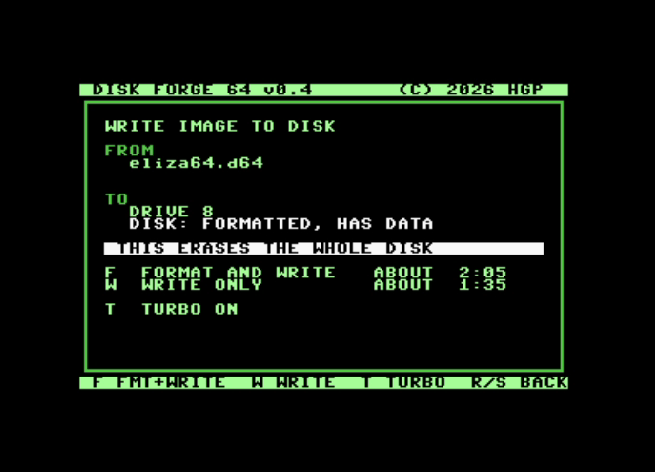
- F7 to write. It shows you the image and the disk side by side, how long each option takes with turbo on or off, and then asks.
- Format + Write on a blank disk, or Write on one that's already formatted.
- During a turbo write the screen goes dark and pulses colour. That's normal — the fast transfer needs the video chip quiet, and the pulse is the heartbeat: the hue walks from blue at track 1 to grey at track 35, so the colour is also your progress bar. The dialog warns you before the screen blanks, and the finished screen shows the full tally: blocks, errors, elapsed.
- RUN/STOP cancels cleanly — between sectors on the slow path, between batches on the fast one.
How it works
The v0.1 pipeline is still the backbone: talk to the Ultimate's command interface, stage the whole image into the REU in one go (the Ultimate pauses the C64's processor during that transfer, and a paused processor mid-write is a corrupt sector — so staging finishes before the drive is touched), then write.
The turbo writer changes what "write" means:
- Custom drive code. The 1541 is a computer — its own 6502, 2 KB of RAM. Disk Forge uploads about 600 bytes of its own code into the drive and runs it.
- A timed 2-bit protocol moves data at ~4,090 bytes/sec over the same serial cable the KERNAL manages 400 on.
- Three sectors per revolution, written in batched jobs, with each batch GCR-encoded up front so the head never waits on math.
- Deterministic scheduling: the tool knows where the disk has rotated to while data transfers, and places every sector to be under the head at the moment the drive is ready for it.
The nerdy details, measurements and all, are in the TECHBRIEF in the download.
How long it takes
Measured on real hardware, writing a full 35-track image:
Turbo Write v0.4 (using a formatted disk)
about 1:35
Turbo Format Only
about 0:26
Turbo Format + Write v0.4 (using a blank un-formatted disk)
about 2:05
No more coffee break; by the time the kettle's on, it's done.
What you need
- A Commodore 64 Ultimate, an Ultimate 64, or a 1541 Ultimate-II+ cartridge.
- A real 1541 connected and switched on, set to device 8. Turbo needs a 1541 specifically; other drives get the stock writer.
- REU enabled, 256K or larger. F2 → Memory Configuration.
- Command Interface enabled. F2 → C64 and Cartridge Settings. Off by default, and nothing works without it.
- Drive A disabled, so the Ultimate's emulated drive doesn't collide with your real one on device 8. The tool detects this at startup and offers to switch it off for you, and can put it back when you quit.
- No emulated cartridge. Retro Replay and friends break the command interface.
- On an Ultimate 64: keep CPU turbo at 1 MHz while writing.
Copy dforge.prg anywhere on the storage and run it from the Ultimate's file browser. The download includes readme.txt with the full credits and license notices.
Limitations, plainly
- 35-track .d64 only. 40-track images, .d71, .d81 and .g64 are refused with a message rather than half-written. (40-track support is next: the formatter already lays down 40 tracks on the test bench, and the writer follows — demo writers, I hear you.)
- No copy protection. This writes standard sectors. The d64 "error byte" extension is accepted but the errors are not reproduced — a protected original will not survive the round trip, and nothing here pretends otherwise.
- The turbo path trades the drive's per-sector write-verify for speed. In exchange it checks the drive's status every batch and re-reads a sector through stock DOS after the run as a spot check. The full disk-against-image verify is still on the list. When a disk really matters, write it with T off — the stock path verifies every sector, and it is only nine minutes of your life.
- The turbo format checks each header as it goes but not the empty data blocks; the write that follows finds every sector through the drive's own search, and the disk is what gets verified. Write with T off if you want CBM DOS's own full-verify format.
- Write protection: turbo checks the tab before starting; the stock path still only discovers it on the first write attempt.
- After a write finishes, press RUN/STOP to get back to the browser; the joystick doesn't do it yet.
- Underscores in filenames show as full stops. Cosmetic; the file still opens.
- One image at a time. No batch, no queue.
How it has been tested
Honestly, and with the current limitations clearly named.
Every build byte-compares TWO written disks: one through the turbo path and one through the stock path, all 683 sectors against the source, on an emulated 1541 running the real drive ROM. Five failure paths are tested the same way — wrong-size and non-image refusals leave the disk untouched, RUN/STOP stops at exactly the right block on both paths, and a deliberately corrupted transfer must FAIL the byte-compare (a gate that can't fail proves nothing).
On real hardware: the emulator and my 1541 have now agreed on every timing measurement seven runs in a row, PAL and NTSC. The acceptance test for the turbo writer was cutting a real game disk in 1:35 and booting it. It booted first try.
What has not been tested, and where you come in:
- Still mostly one machine — mine. That is the main reason this is public.
- A 1541-II, or drives with well-worn or off-spec mechanics. The turbo writer is timed against the disk's rotation; a drive spinning well off 300 RPM is exactly the report I want.
- An Ultimate-II+ cartridge. Same command interface, should work, 256K REU is enough.
- Very large directories.
Feedback that would actually help
- Your machine, your drive, and whether it worked — turbo and stock both, if you have the patience.
- Any screen that shows a number or a message that looks wrong.
- Timings, if you have a stopwatch handy.
- Anything that hangs. Include what was on screen.
Comments on this page are the place for all of it. There is a diagnostic in the download, dfprobe.prg, which reports what it finds on boot: command interface version, REU state, what is on the serial bus, and a drive-code test. If something does not work, a photo of that screen tells me far more than a description can. The probe also has a menu of lettered tests I may ask you to run when we debug — the safe ones say so, and the ones that write anything demand a Y/N and say ERASES TRACK 35 in capitals first, and mean it: use a scratch disk.
Credits: the handshaked control protocol is adapted from Lasse Öörni's Covert Bitops Loadersystem (MIT — full notice in readme.txt); the relocated-ROM-writer technique is OpenCBM prior art (Joe Forster/STA); about 80 bytes of Commodore's 1541 DOS ROM ride along as the write tail, as fastloader tradition demands. Original work and full acknowledgements in the readme.
(C) 2026 Horned Goat Productions
Download
Install instructions
Copy dforge.prg to a USB stick, SD card, or the C64U's flash.
Connect your 1541 and switch it on, then power on the C64U. In the C64U settings, enable the Command Interface (F2 → C64 and Cartridge Settings, off by default) and the REU at 256K or larger (F2 → Memory Configuration). No emulated cartridge.
Run dforge.prg from the C64U's built-in file browser. Disk Forge checks for a virtual drive on the bus and offers to disable it so your real 1541 has device 8 to itself, and it can switch it back when you quit.
Navigate to a .d64 and highlight it. Put a floppy in the drive and press F1 to scan; Disk Forge tells you what is already on the disk before you overwrite it. F7 writes, with the option to format first.
Go have coffee. Rinse and repeat. That's it.
Development log
- Updated Turbo Format + Writer v0.4 Now Available1 day ago
- New turbo mode version 0.3.7 - Cut a disk in about 90 seconds!3 days ago
- v0.1 early release5 days ago
Comments
Log in with itch.io to leave a comment.
is good tool thanks
Thanks for the feedback and for giving it a try, I'm glad you like it!